Let's get to the programming now!
The purpose of the activity is to display an arrow on the LED matrix depending on the tilt of the board.
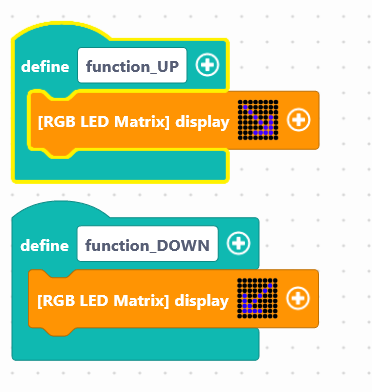
We will have to use the block which allows to create functions. It is called "Define....", in the Functions of the block locker. It allows you to create a sequence of instructions outside the main program that we will use if necessary. This makes it easier to run on the map.
We have two functions to create: a function that we will name "function_UP" and a second "function_DOWN". In this block we will include the block for displaying the matrix and drawing two arrows.
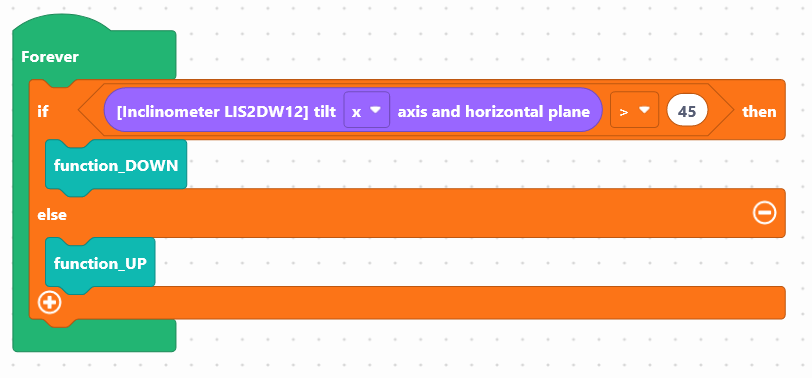
To display one of the two functions in relation to the inclination of the map, it is necessary to use the block of conditions:
"If...then...else" available in the
Logic.
And insert the block corresponding to the inclinometer of the NUCLEO-IKS01A3 module: "[LIS2DW12 inclinometer] inclination between the z and the horizontal plane", available in the
Sensors, to retrieve the value of the module.
The condition value to change the function will be set to > 45, i.e. a value of 45° angle.
Use the following interface to program the module:
[iframe]https://en.vittascience.com/l476/?link= 631b9c6a7f774&mode=blocks[/iframe]
Once the program has been created, it must be copied onto the card. To do this, you must use the "Upload" button (see Activity 0: Getting to grips with the board)
Tilt the board and watch the arrow change position!
You succeeded? Perfect, you now know how to program the LED matrix using your NUCLEO-L476RG board!
Discover the other activities of the IoT Sensors kit by clicking on the icons below.



.jpeg "matrix-EN")